Posts

Showing posts with the label ubuntu

Windows equivalent of Linux's /etc/hosts

On Unix,  /etc/hosts  file contains mappings between an IP address and a name of the host. It overrides mappings from DNS.  Windows has an equivalent of this file: c:\WINDOWS\system32\drivers\etc\hosts Source  http://blog.kowalczyk.info/article/Local-DNS-modifications-on-Windows-etchosts-equi.html
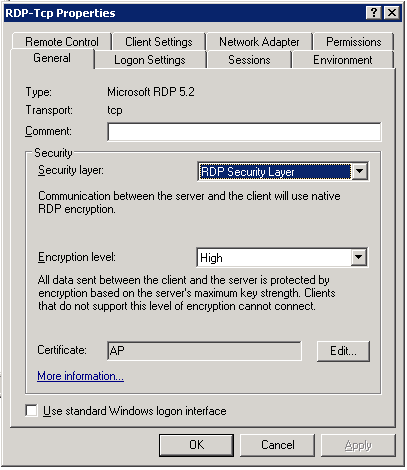
Ubuntu Remote Desktop to Windows Server

Image
On your Ubuntu machine, open Terminal Server Client or tsclient, install if not available, using sudo apt-get install tsclient Try giving RDPv5. If unable to get through, you need to change the Terminal Server Settings on Windows Server 2003 R2 machine. Go to Control-Panel->Administrative Tools->Terminal Services Configuration->Connections->RDP-Tcp. Right click for properties. In General tab, under security frame, from the dropdown combo having Security Layer, select RDP Security Layer. If it have SSL, you may not be able to connect from Ubuntu machine, but would be able to go from Windows machine. Below is the snap

Some cure for abrupt SVN hickups.

Image
Committing the binary files to SVN: Normally binary files like libs, and .a wont be committed on SVN. They are prohibited to be added to your neat clean repository up there in the heavens. Ubuntu There are two ways to enable that. On command line, it is simple. Go to the folder where the binary files, i.e. .a and .lib are located.. Type the following, the path is just for example, you CD to your own path. cd /development/project/library svn add --no-ignore svn commit OR you can remove the global ignore rule from configuration file. cd ~/.subversion/config cd /etc/subversion/config sudo svnserve -d cd /development/project/library sudo svn commit Windows On Windows you can pop up the the SVN Settings dialog, in the General Tab, you can see Global Ignore pattern text box. There is the *.a and *.lib. Just remove the entry, i.e. *.a from this text box. This will make the changes global to Subversion. This would allow you to commit required files on SVN.